Showing posts with label HDMI Cable. Show all posts

May 23, 2021

Heart of your home cinema

Cinema is the one place that no matter what age or gender that will likely to go for some family entertainment or even with friends. Thanks to the pandemic that enjoyment is pretty much non existing for now at least. Home cinema or theater has been the next best thing to have. This days with so much high resolution content from blu ray discs to online streaming. Is totally no brainer to seat at home to enjoy the endless titles of movies. 

Traditionally, it has been the TV that dominant the home theater or I will say TV is a common hardware you can find in almost every home in nearly any countries around the world. The best thing is the prices of TV this days is very much encouraging and the size of TV is easily goes up to 85" with affordable price. Although that is the case but a relatively large screen size of 100" or more still is unreachable for most for the TV. The best alternative option is the projector. The same can be said for projector as well with much affordable price and easily bought this days.


For people who are venturing into projector or about to take the plunge, there are few things to consider to get the best of projector or the very least avoiding any blunder. Of course the first thing will be the projector itself. What kind of projector, just like TV with many different models and specs. Probably when choosing a display (TV or Projector) will think about the picture quality in term on resolution. Is either fullHD or 4k display. Is pretty straight probably for most to go with 4k however this will be also more costly. Next thing which is very important is the light source. Traditionally projector uses lamp as light source. Just like TV using backlighting as light source. Recent years, laser is being introduce as light source to the projector world. Now the thing with different light source of course will give you different kind of picture quality and so on but the thing most people will consider is the cost. Laser projector is more costly than the lamp projector. Of course the good thing about laser is the long life span compare to a lamp that might burn out in about 3000-4000 hours. Different brands of projector the cost vary as well. 


                                                                            3 LCD


                                                                               DLP

The next part of the light source is how it is use to project the image into the screen. There are 2 types which is the 3LCD and DLP. As from the image you can see that 3 LCD uses 3 pieces of mirros for 3 prime colours of red, green, blue to project the image. Whereas DLP uses a colour wheel for the 3 prime colours. DLP being the more simple setup also means the cost is lower than 3 LCD in general of course in term of picture quality, 3 LCD will be preferred as the colour is more accurate.


Of course once you know which projector to go, you will also want to know screen. There are many screen types but the main consideration to start will be the size. How big you want your screen to be. This need to depend on your projector throw as well. What is means is that, how far away the projector from the screen to have the size that you want. Every projector is different. This is best refer to the projector brand with proper calculator to get this right. Also you can consider acoustic transparent screen. Meaning the screen has micro or tiny holes for sound to pass through. With this kind of screen you can place speakers behind the screen and not blocking the sound. Finally we can choose for fixed screen or roll up screen. 

Projector and screen is done and next will be placing the projector. Some prefer to mount the projector, some will place it on some rack or furniture. Now if you do mount the projector, it is important to know the mount so you will know if that fit your projector. Not all projector will fit into standard projector mount. Also the weight need to be consider. The placement of the mount is important to make sure you can have the projection image throw into your screen. Some projector do have function to move the display or screen shift. If your projector doesn't do that, than is even more important to place the mounting accurately for the display to be in proper size and location.


Last but not least is the HDMI cable. Assuming with projector, usually you will need long run cable from player to the projector. Usually cable length is really not much of a concern, after all it is digital cable. Now the thing with long run cable is the speed of the cable will reduce on long distance. Again this is not much of a concern most of the time. Now the issue we need to consider is the 4k HDR or HDR+. To enable 4k 60hz image with full colour chroma of 4:4:4, the cable need to be able to sustain 18 Gbps speed. What happen if it fail ? The possibility of not getting any image. The audio part is fine as HDMI can carry any kind of surround format without issue. Normal copper cable is not enough to run high speed. Its like home high speed internet is usually fiber cables are use. This apply as well for HDMI. To achieve high speed requirement for the display, fiber HDMI is the answer to it.

Finally once you have your hardware setup is time to enjoy your movie with some nice popcorn. 


April 29, 2021

Picture Quality Aspirations, Arcana HD Fury

Bothe ends of the Arcana HD Fury, which looks like a simple splitter in & out device with a nice fluorescent screen on which you do parameter settings to effect the picture & sound quality. The only thing I dislike about that display is that the text size use is too damn small!

I must say the promise was there when I heard my buddy told me that this little black box called Arcana HD Fury was capable of helping our Full HD projectors to cope with 4K movie source or at the very  least made them bearable. And so with such recommendation, I decided to get one. All you need is one extra HDMI cable for it to work, he said. Don't get those fancy cables, just the one that came with your Blu-ray player will be fine, he said.

I waited 2 weeks for my order to arrive my door step. Installation seems easy enough, plug the input HDMI cable from source(Oppo UDP-203), the output the HDMI cable to projector(Optoma UHD50). I ran the Arcana HD Fury in default mode, and at first play, a BD that I am very familiar with, Midway. WOW! I am impressed, the colors really "pop" out the screen with it's rich vivid tone, like I had just upgraded to a JVC projector or something! I thoroughly enjoyed Midway all over again. I was happy as a kite! 

The package that came, the Arcana HD Fury, and wallwart power supply & power cable which is optional, but I bought it for voltage combability assurance.

If these text pops out on the left bottom corner of the screen, means good, it works!

The happiness didn't last long unfortunately, the next moment I throw in a 4K disc of the same movie, and what greeted my was a red washed out screen! And so my trouble begins with the Arcana HD Fury! Another call to my buddy reveals that there compatibility issues between the Arcana HD Fury with certain brands of BD players, projectors or just HDMI cables. I must agree that it could not all Arcana's problem either, as from the very start, I felt the Optoma had rather weak connectivity to my Oppo BD player. I had tried many HDMI cables to get that connectivity to a reliable connectivity level. However even then, sometimes I still need to reset the projector or BD player or both to get them to work together.

I tried like about 5 different kinds of el cheapo or OEM bundle HDMI cables in order to try and make things work. Also tried various setting combos on the Arcana HD Fury, but none work! Certain setting you get that red washed out screen, and yellow or cyan washed out screen with other setting combos, or even pixelated black & white screen with other setting combos. There's a few parameters that one can set to try & make things work or make the picture quality better.

Regarding the setting parameters, you need to be very technically inclined to make it work! Otherwise, please just stay with default settings. 

This is what I got when it doesn't work, available not only in Red, but Cyan & Yellow as well depending on HDMI cable choice & parameter setting combo on the Arcana HD Fury! This happens when I used 4K movie source materials.

Now, when the Arcana HD Fury works, the picture quality is actually brought up a notch! This is with Full HD source material. Hacken Lee in concert!

Then one day, after more than 3 weeks working on making 4K movie files of BD work with the Arcana HD Fury, a slightly bright spark can in to my mind, to connect the Arcana between my Denon X-4400H AVR & the Optoma projector. Again lots of HDMI cable swap and parameter setting combos were made to make it work. Finally after fiddling for a week, I finally found a working combo using an old HDMI cable which was bundled with my Pioneer BDP-450 player and default settings on the Arcana.

With the 4K movie compatibility issue fixed, again I plomk in the same 4k Midway BD in to the system, and behold. There was some improvement compared to 4K movies running without the Arcana. As the beer budget Optoma doesn't throw enough light for 4K source materials, I almost always prefer to watch Full HD only BD or files. Using the Arcana in the AV system the improvements were slightly brighter picture, better contrast, and as result, make 4K source material that bit more bearable, especially in darks scenes where the Optoma projector naturally struggles the most. In dark scenes, the Optoma typically adds lots of visual noise to the 4K source material being played. The same 4K playback via the Arcana in the system gave less visual noise, making dark scenes that bit more bearable.

There was one draw back when using the Arcana in between the Denon & Optoma compared to Oppo direct to Optoma, leaving the Denon only for soundtrack duties. When used as such to make 4K source materials work, the Full HD experience suffers. When I say suffers, I mean in relation to picture quality attained as when used between Oppo & Optoma. You see, that vivid, rich popping color effect I got earlier is now being diluted. Having said that, the picture quality performance still got a small lift compared to as without Arcana in the loop.

With that, I settled down and just enjoy my movies as is. The entire Arcana HD Fury experience was NOT as positive as my buddies. I think it's because they all have JVC & Sony projectors. Me on the other hand, have 2nd rate Optoma. I read in many forums that the Arcana HD Fury doesn't work well with other 2nd rate brands such as BenQ, Epson or Vivitek either. Many feedback in those forums also commended the excellent consultative response from the Arcana people if you run in to issues as consumer. I did not contact them with my issues so I can't vouch for them. From my experience, the Arcana HD Fury is not something one buys on a whim like me. I paid steep price for it in terms of performance compromise & compatibility issues. All I am saying is do more research on the WWW before you commit to this product. I also feel that this product requires competent technical knowledge in regards to the parameter settings offered. It's not a plug & play product, and YMMV caveat certainly applies. 

I hope others will have better experience then me on this. 

December 26, 2012

2 Is Better Than 1, Supra High Speed HDMI With Ethernet Cable.

Supra High Speed HDMI with Ethernet cables supports up 4k resolution display devices.

I managed to get the second review sample of the Supra High Speed HDMI cable, with a purpose to confirm if 2 cables(one from Blu-ray player to AV Receiver, and another from AV Receiver to display device) of the same quality, can really improve audio and visual performance?

The simple answer is YES!, using the same Tora! Tora! Tora! Blu-ray movie as reference, colour palette becomes richer, and skin tone healthier(but never too red). Most important difference is the black details and grey scale linearity improvements. Again on the dark scenes where Japanese Zero fighters were taking off from the flight deck of aircraft carriers, in the dawn of the morning, I could now see all the whole dark green plane with full details, and the wooden flight decks of the carrier. Details like wing flap positions, exhaust fumes from engine as the planes goes full throttle upon take off, is now clearly visible.  It's remarkable how much more one can see in the dark!

Another area I noticed a difference is the sound, which now gives vocals a more anchored stability, and the 5.1 chanel separation of panning surround effects that much more vivid. This adds a more immersing quality to movies. However, I do suspect the improvements in sound is more due to cable length, rather than the effect of a second cable, due to the second cable only delivers visual signal to display device, not sound. I requested a 1.5 meter length Supra High Speed HDMI cable this time as opposed to a 2 meter one earlier. In the process of connecting the cables, I had swapped the shorter cable to connect between Blu-ray player to AV Receiver and the longer one between AV Receiver to display device. Hence only the shorter cable was carrying both sound and visual signals, as opposed to the earlier longer cable used.

To re-confirm my suspicion, I did another test on my other DVD player and plasma TV rig, but only this time, with RM$25.00 generic HDMI cables of the same brand, but different lengths. I got the same result, where the shorter HDMI cable out performed the longer cable by some margin, enough to be easily notice able, even with lower resolution format and display device.

This proves that if one does not wish to spend big $$$ on HDMI cables, the best solution is to keep it as short as possible. By the way, the shorter, 1.5 meter Supra High Speed HDMI with Ethernet cable retails at RM$395.00 each. I am now Supra HDMI all way!

Supra products sold by A&L Audio Station, contact Yap(Wah Chai) at 03-79582884.

December 3, 2012

Super Supra. Supra High Speed HDMI With Ethernet Cable.

Supra High Speed HDMI With Ethernet cable.

Many folks(especially the tech brigade) are in the opinion that HDMI do not make an iota of difference when it comes to picture quality. As for sound quality, a plausible "maybe" is the usual answer. Hence when the good guys at A&L Audio Station ask me to review the latest range of Supra High Speed HDMI with Ethernet cable, I was thinking about the tough "job" ahead. I mean if I plug the cable and see/hear no difference, the cable would have to be returned, and no review will be written, i.e. time(a precious commodity now days) wasted. Thankfully, and rather unexpectedly, this is NOT the case.
The rather basic blister pack packaging, which means more value for performance.

The 2m length review sample of Supra HDMI cable came in basic blister pack and the item it self does not look very fancy either(which is good, because audiophiles have a misplaced impression that thick, heavy cables are best! Not the case with HDMI cables, because thick, heavy and stiff HDMI cables have been known to break at the termination point after some time, or worse still, rip out the HDMI jack from your display device, from repeated plug in/outs!). Hence light weight, shielded and nimble HDMI cables are best for the job of transmitting audio and visual signals. I proceeded to plug the Supra HDMI cable between my Pioneer BDP-140 Blu-ray player to my Denon AVR 1612 AV receiver.
This 1970 release is more historically accurate and balanced version of the events leading up to the attack of Pearl Harbour, which started the Pacific War. Comparing to the latest movie by Micheal Bay tittled Pearl Harbour simply, has more fictional elements in the plot, and ends with the success of 1942 Doolittle Tokyo raid, which is the start of the war tides turning towards America's favour in the Pacific Theater.

The opening scene of Tora! Tora! Tora! The re-mastering for Blu-ray release is worth another view for it's pristine restored picture quality. Colour tone is beautiful and accurate at once.

From the very first disc, the re-mastered for Blu-ray Tora! Tora! Tora! I was immediately blown away by the opening scene, as pictured above, where a boat load of Japanese Imperial Navy sailors, all parading in their white uniforms. I noticed that all their uniforms had varying shades of white(some yellowish, some grayish, some slightly bluish and some just plain whiter than others, just like in those laundry detergent advertisements!), from one sailor to another. As I had just finished the very same movie just a few hours ago with my regular reference cable, a Chord Super Shield HDMI in place. My memory of the movie is still fresh, therefore was surprised by the detail colour tone portrayal of the different levels of whiteness on the navy uniforms. Another scene from the very same movie that showcased the Supra's talents were the Zero fighters take off from aircraft carrier at dawn, en-route for the Pearl Harbour attack. Some of the early take off scenes were rather dark, and the dark coloured Zero fighters couldn't stand out from the deck of the carriers when viewing with the Chord cable. However, with the Supra HDMI, I could make out a whole lot of dark details of the Zero fighter, as it takes off from the carrier, including it's darker shadows beneath the wings, reflected from the deck.  Such is the Supra's prowess when handling dark image details.

So far, so good, I also noticed better depth portrayal in the scenes where planes are flying with the sky as it's back drop. Human flesh tone is entirely realistic, be it Negros, Caucasian or Asian types. Whilst I only used Tora! Tora! Tora! as a reference illustration, I noticed nearly the same detailed improvements on both ends of the grey scale linearity spectrum on every movie I watched. I found myself pulling out old movies after old movies, just to have a go on what was missing previously. I became an obsessive videophile, all because the Supra High Speed HDMI cable allowed me to do so easily. Again, even my family members who are not normally not too bothered about such things noticed so, that they asked me not to return the Supra cable, since it's relatively affordable, priced at RM$406.00/2M length.     
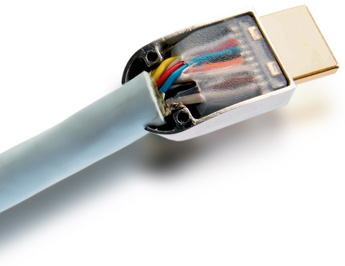
The insides of the Supra High Speed HDMI With Ethernet cable.

The Supra High Speed HDMI(ver 1.4) With Ethernet supports 3D pictures and resolutions up to 4k on specification. I am now enjoying my movie pictures more effortlessly, but what about the sound? I am happy to report that this HDMI cable likes to rock! With soundtracks that feature rock music, like those from The A-Team and Battleship, I not only enjoyed the picture, but the slamming sound quality as well. Bass seems to dive an octave deeper, and the sub-woofer seemingly working harder than usual to rumble my sofa too.  This is my new HDMI reference cable, and it's so..... good in performance yet affordable in price, that I am beginning to wonder if having the second Supra High Speed HDMI cable from the Denon AV receiver to my Samsung plasma display is gonna yield further picture quality gains? Stay tuned to find out as I request for a second sample to see if two is indeed better than one!

Supra is sold by A&L Audio Station, contact Yap(Wah Chai) at 03-79582884.